

Beyond Raised Hands: What Digital Polling Can Reveal
If students can vote by raising their hands, why use polling tools at all? Both provide quick feedback and help educators gauge understanding. However, a show of hands and a poll do not always reveal the same information about student learning.
By Gwenna Moss Centre for Teaching and LearningImagine a nursing instructor presents a patient scenario and asks students to choose the most appropriate next intervention from three possible options. Students could indicate their choice by raising their hands or by responding through a polling tool.
If students can vote by raising their hands, why use polling tools at all? It is a reasonable question. Both approaches allow students to respond to a question. Both can provide quick feedback. Both can help instructors gauge understanding and adjust their teaching.
At first glance, a show of hands and a polling tool appear to accomplish the same task. A show of hands is quick, familiar, and requires no technology. In many situations, it works perfectly well. If an instructor wants to know whether students have completed a reading or would like another example before moving on, a show of hands may provide enough information. However, a show of hands and a poll do not always reveal the same information about student learning.
What Polling Reveals
Polling can make students’ thinking more visible. When students raise their hands, instructors often rely on a visual estimate. Polling can display responses as precise percentages, charts, and word clouds, which makes it easier to see how thinking is distributed across the class. Some polling tools also allow students to respond anonymously, which can encourage participation from students who may be reluctant to share their answers publicly and make it easier to share uncertain or unpopular answers. Polling software also allows students to submit responses independently before seeing the results, thereby reducing peer influence in their choice selection. As a result, polling can provide a more accurate snapshot of student understanding than a show of hands.
Practical Examples
Imagine teaching a large first-year course and asking students: How confident are you in applying today's concept on an exam? A quick show of hands suggests that most students feel comfortable. A Poll Everywhere poll (see Fig 1), however, may reveal that nearly half of the class is unsure. The technology has not changed what students know. It has simply made their understanding more visible. That visibility matters. An instructor who sees widespread uncertainty can provide additional examples, revisit a challenging concept, or create an opportunity for discussion before moving on.
Figure 1
Digital polling reveals variation in student confidence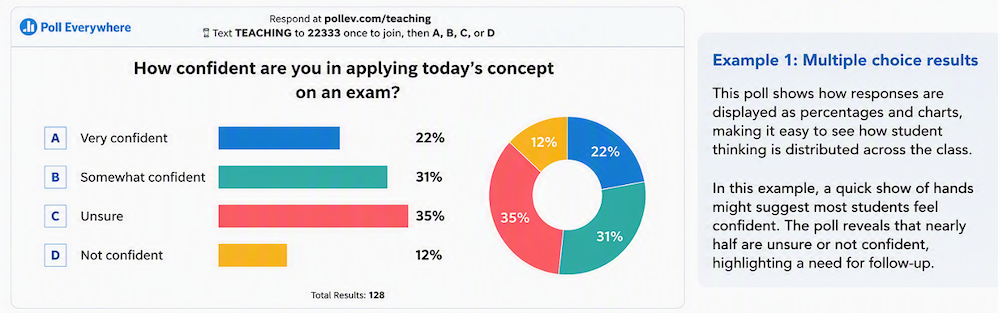
Note. AI-generated illustration of a polling activity using demonstration data. No student data were used or collected.
When many people think of polling, they imagine a simple multiple-choice question. While those questions can be useful for checking understanding or uncovering misconceptions, polling can support a variety of learning activities.
For example, instructors might:
- Ask students to predict the outcome of a demonstration before revealing the answer.
- Use a word cloud (see Fig 2) to gather prior knowledge or perspectives on a topic.
- Have students rank possible solutions to a complex problem.
- Use an image-based question to identify structures, locations, or areas of interest on a diagram or image.
- Conduct a quick confidence check before moving to a new topic.
Figure 2
Word Cloud activity revealing student perspectives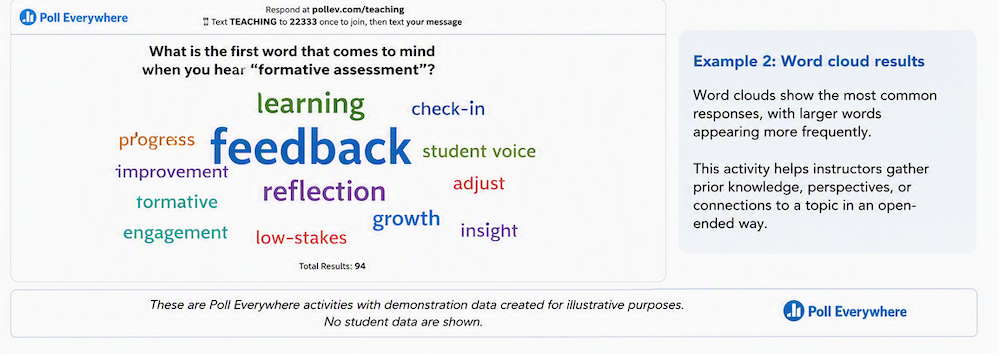
Note. AI-generated illustration of a polling activity using demonstration data. No student data were used or collected.
These activities shift the focus from collecting answers to exploring student thinking and are more accessible through polling software than through raising hands. More importantly, the results can inform what happens next. Instructors might provide another example, revisit a challenging concept, invite students to explain their reasoning, or facilitate discussion around competing ideas. In this way, polling becomes more than a response tool. It has become a tool for feedback and discussion.
Polling Tools Available at USask
At USask, instructors have access to several institutionally approved polling tools including Poll Everywhere, and the Zoom polling feature. Each offers different ways to collect student responses in face-to-face, remote, and hybrid learning environments.
Conclusion
The next time you ask a question in class, consider what information you hope to gain. If you need a quick indication, a show of hands may be enough. If you want a clearer picture of student understanding, confidence, or misconceptions, a polling tool such as Poll Everywhere can provide insights that are difficult to obtain otherwise.
The goal is not more technology in the classroom. The goal is to provide better information to support learning.
Title image credit: No-longer-here on Pixabay
This article was created with the assistance of AI tools, as described in the GMCTL AI Disclosure Statement.