

Separately Scheduling the Release of Comments and Grades in Canvas
Help students engage deeper by ensuring they receive comments when they are most prepared to act on them and the comments aren’t overshadowed by the numerical grade.
By Gwenna Moss Centre for Teaching and LearningCanvas introduced (in the Winter 2026 term) a helpful new feature that allows instructors to schedule the release of grades and feedback comments. Grades and comments can now be released together or separately. Previously, both had to be published at the same time, and instructors had to choose between automatic or manual posting. This added flexibility gives you more control over when students encounter feedback, making it easier to align release times with the moments when that feedback can have the greatest impact on learning and growth.
Intentionally scheduling the release of feedback aligns well with USask’s 6th assessment principle: Effective assessment is constructed and sequenced in ways that support positive student mental health and well-being. Thoughtful timing of feedback can reduce stress, foster a sense of clarity, and help students engage with comments when they feel most prepared to process and act on them. As well, the sequence and timing of feedback matters, especially when assessments are scaffolded to build on one another, because well-timed comments support students in applying what they’ve learned at the moment it can make the most difference.
Why Timing Matters for Feedback
Well‑timed feedback is more likely to be read, understood, and used by students, and can help reduce the stress and uncertainty students often feel while awaiting evaluations. By separating the release of comments from grades, you can encourage students to focus first on the ideas, suggestions, and next steps you’ve provided, rather than jumping immediately to the score.
Another benefit is the ability to strategically release feedback before a class discussion, review session, work period, or next assignment being released. This supports student preparation and increases the likelihood that the feedback will be reviewed and applied meaningfully.
Finally, there may be times when you are not yet ready to release grades, but students would still benefit from seeing comments; for example, when they are preparing revisions or beginning a related assignment where timely guidance matters most. Releasing comments first in these moments can also support student well‑being by reducing uncertainty while still holding back grades for a final review.
How to Schedule Feedback Release in Canvas
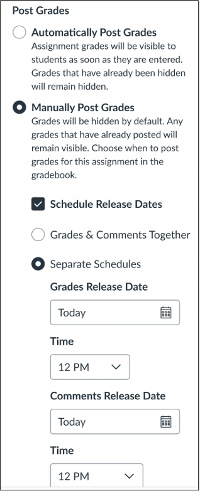 You can set posting schedules through Grades → Grade Posting Policy (click the three-dots icon in the top row of Grades) for each assignment:
- Select Manual posting.
- Choose whether to release grades and comments together or on separate schedules.
- Set a date and time for each release, and Canvas will post them automatically.
Instructors can still post grades or comments early if needed as manual posting overrides the schedule.
When using separate schedules, Canvas requires comments to be released before grades.
Getting Started
If you already use a manual posting policy, try scheduling release times for your next assignment. Even small shifts in timing can make meaningful differences in how effectively students engage with the feedback you provide.
Contact GMCTL@usask.ca for consultation and workshop opportunities.
Title image credit: Pete Linforth from Pixabay
This article was created with the assistance of AI tools, as described in the GMCTL AI Disclosure Statement.