

Flexible Assignment Deadlines: Grace Window Model
How to implement grace windows in Canvas, when to use them, and why they support accessibility and accountability.
By Gwenna Moss Centre for Teaching and LearningGrace Window (Soft + Hard Deadline)
The grace window model provides structured flexibility by pairing a recommended soft deadline with a short grace period and a clearly defined hard deadline. This approach supports student access and well-being while preserving course pacing and academic standards. By making flexibility predictable and time-limited, grace windows reduce the need for individual extension requests and help both students and instructors plan their work more effectively.
Assignments include a recommended soft deadline, followed by a short grace window (typically 48–72 hours) during which students may submit without penalty or documentation. A firm hard deadline applies after the grace period.
Why Use It
This model balances flexibility with structure while preserving the pacing of the course and removing the need for extension requests. Students are held to the same criteria and standard; only when the submission window is open. Clear due dates and consistent rules ensure fairness and academic integrity. This model is best for:
- Large classes
- Predictable assignment schedules
- Courses where feedback timing matters
- Assessments are not strictly time-bound
Why This Works for Students
From a student perspective, this model provides dates that are visible in multiple places, expectations that are upfront, firm, but fair, and students do not need to guess how long the flexibility lasts.
Example: You are teaching a first-year course with weekly written assignments submitted through Canvas. The course enrolls approximately 180–250 students, and timely feedback is important to support ongoing learning. The soft deadline appears in student Canvas calendars to remind them of when the assignment is due, however, they have until the hard deadline to submit their assignment without penalty. This allows the students to ensure the completion of their assignment, more time for you as the instructor to provide feedback and reduce extension requests.
Canvas Tools to Support Grace Windows
Within Canvas, you can provide both soft and hard deadlines for assignments. When creating your assignment,
- use Due Date as the soft deadline. This date will show in the student’s calendar and the To Do list on their home page.
- Available from shows when the assignment opens for students to submit their work.
- Until is used as the hard deadline for submission. Students will not be able to submit their assignment after this date.
- The Grace window, where no late penalties are applied, is between when the assignment's Due Date and the Until date.
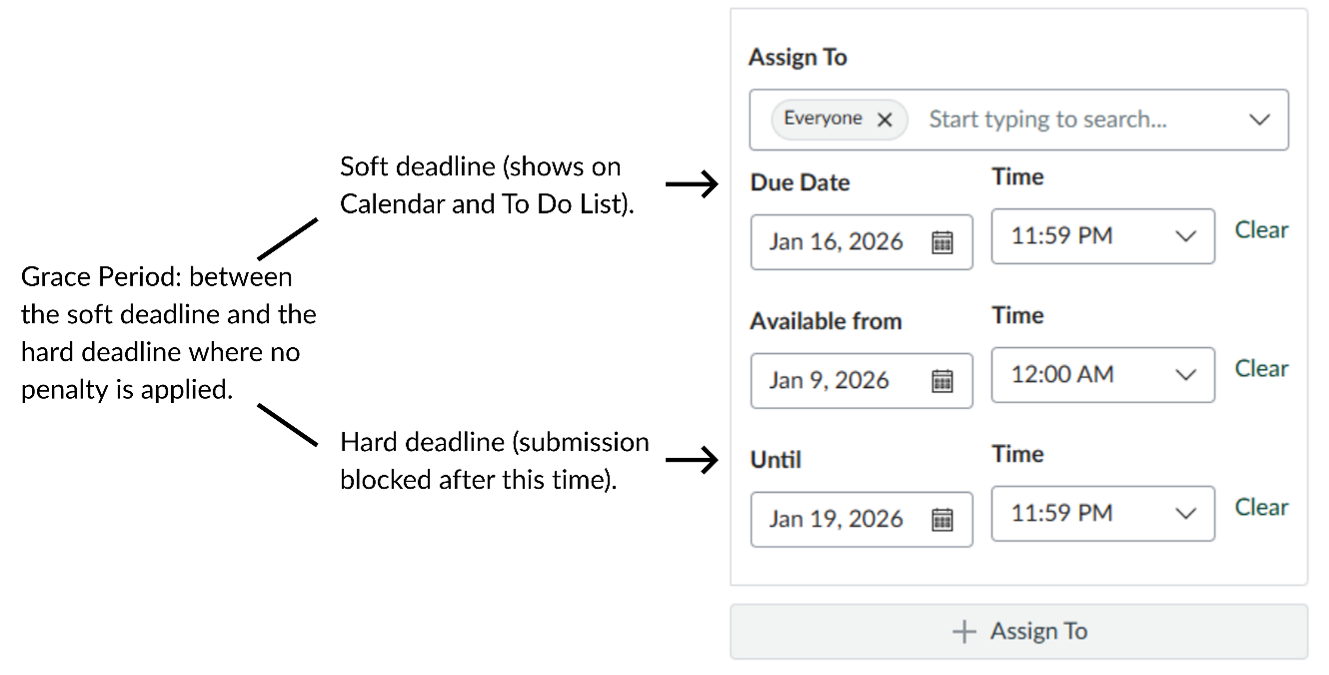
Canvas screenshot of the assignment dates set up with a grace period
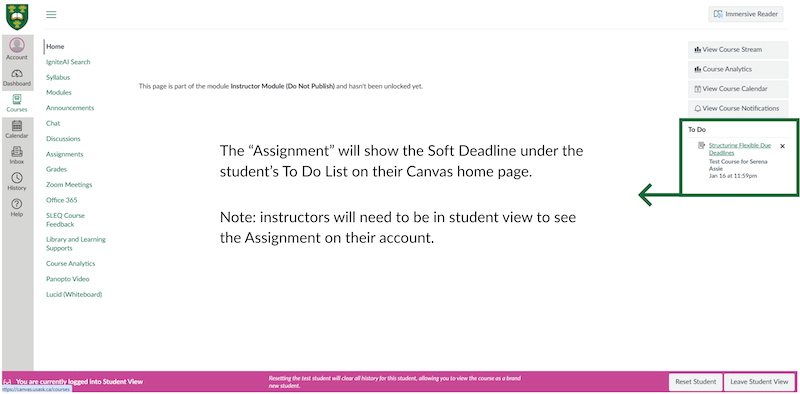
Canvas screenshot of the student view To Do list
Key Takeaway
Grace windows work best when deadlines are clearly explained, purposefully timed, and consistently applied. When students understand why deadlines exist—such as to support timely feedback and manage workload—they are better able to plan and engage with their learning. The goal is not to remove deadlines, but to design them in a way that supports accessibility, reduces stress, and keeps everyone on track.
For support and guidance on designing flexible and inclusive courses connect with the Flexible Learning Team (FLT) at the Gwenna Moss Centre.
---
Article Series: See all articles related to Flexible Assignment Deadlines
- Structuring Your Courses with Flexible Assignment Deadlines
- Flexible Assignment Deadlines: Grace Window Model (this article)
- Flexible Assignment Deadlines: Drop Lowest Assignment Model
- Flexible Assignment Deadlines: Rolling Deadlines with Checkpoints
Title image credit: Serena Assie, Instructional Designer, GMCTL
This article was created with the assistance of AI tools, as described in the GMCTL AI Disclosure Statement.