

Getting AI to Write Questions for You
Learn about prompting Microsoft Copilot to have it generate formative assessment questions for you.
By Gwenna Moss Centre for Teaching and LearningYou know you should make your class more active.
Asking students regular, low-stakes questions about the key concepts, skills, and processes you are teaching is essential. In a 50-minute lesson, doing that five times is great. You shouldn't grade these questions; instead, have students talk them through with each other. Even when you know this matters, it can be hard to do.
Who actually has time?
We wind up skipping active-learning components because we're already spending so much time building slides and creating assessments, and then even more time marking. The good news: there is now a fast, free way to get a generative AI to draft those questions for you. It's called prompting.
Tell generative AI to do it for you.
We recommend using a USask-approved AI tool (that operates in a protected mode), which lets you use a capable model while protecting your data.
Below is a higher-education example from USask faculty experts in generative AI, with a step-by-step walkthrough of using the tool to create formative (assessment-for-learning) questions.
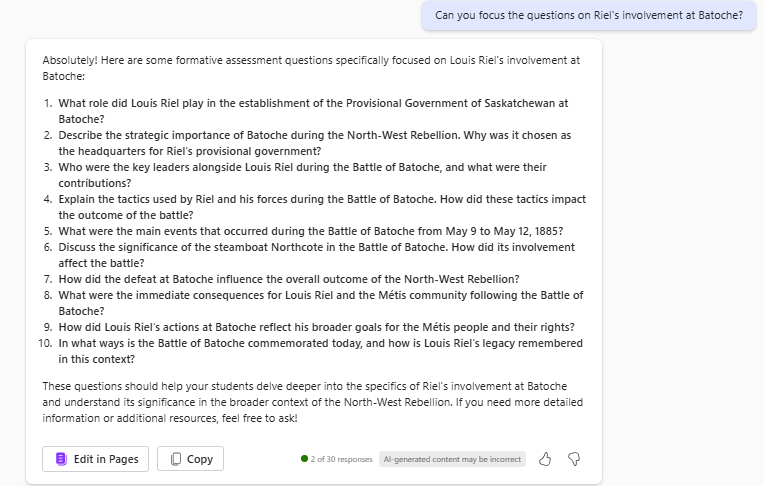
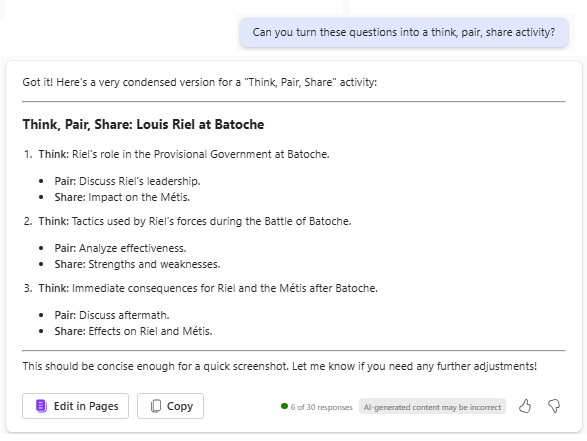
AI can do much more than practice questions. Use it to build case studies, craft good examples, draft effective rubrics, and create sample student work for your students to assess. You can prompt it to write in your voice and tell it what to emphasize. Use the prompting process to customize it to your needs.
|
For more, see this resource by GMCTL - Prompting AI for Course Design: Tips and Templates. |
Learn more:
- Watch a short video summary of What Large Language/generative AI tools are, and how they work.
- Attend a GMCTL workshop to learn more about using GenAI.
Title image credit: Geralt on Pixabay
Updated Sept 2026. This article was created with the assistance of AI tools, as described in the GMCTL AI Disclosure Statement.